1. Export a CSV marker file from Pix
Open the comments panel on the right side in Pix. Press the three dots and select "Export". Now you can then download the CSV file from Pix.
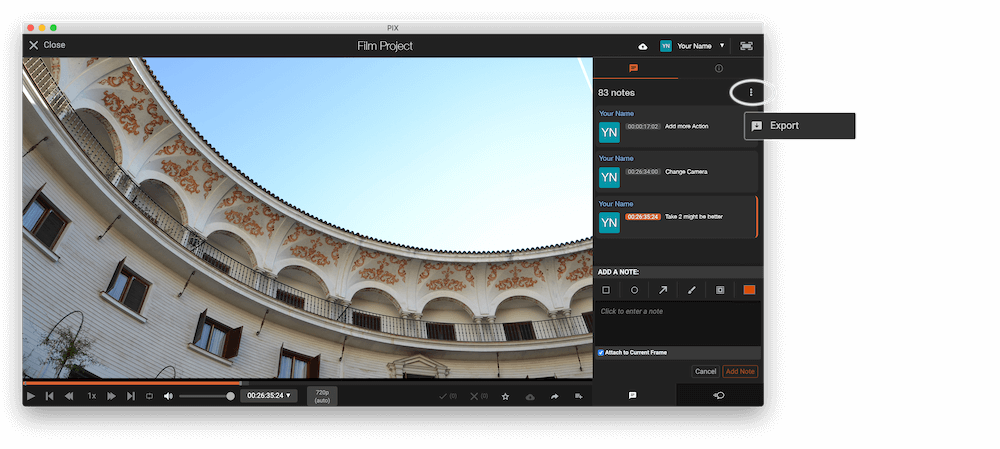
The timecode in Pix starts with 00:00:00:00 for each clip, so you may need to use the offset function on EditingTools.io to sync it with you timeline or move it manually in your NLE (editing software).
2. Use the "Markörkonverterare" to convert the CSV marker file into a SRT subtitle file
Open the free Markörkonverterare, select "Pix Systems > Comments (.csv)" and set "convert" to "SRT". Generate and download the file. Om du har problem med att konvertera filen kan du kontakta vår kostnadsfria support.
3. Import the SRT subtitle file into DaVinci Resolve
To import subtitles go to "Files -> Import -> Subtitle...". Select the subtitle file and import. You can now drag and drop the subtitle file from the Media Pool into your timeline.
🚀 Klart
Det var allt för den här gången! Om du tyckte att handledningen var användbar får du gärna dela den för att stödja oss. Om du har förslag på hur vi kan förbättra arbetsflödet, hör av dig!